
How to Choose a Smart Lock Manhole Cover in 2026

Choosing a smart lock manhole cover in 2026 is about more than adding digital access to a heavy lid. A Manhole Cover With Smart Lock should fit the site’s traffic, weather, maintenance routine, and security needs. A cover beside a quiet utility path faces different demands from one beneath a busy road. That difference matters.

Start with the basics: load rating, material, corrosion resistance, locking mechanism, and installation requirements. Then examine how authorized staff unlock it, manage access, and receive alerts. Battery life is important, but so is what happens when power or network service fails. Ask for clear product specifications and maintenance guidance. If possible, test the system under realistic conditions, including gloves, rain, and weak signal. Small details matter.

Reliable selection also means checking how the cover integrates with existing infrastructure. Confirm dimensions, frame compatibility, and whether routine inspections can be completed without special delays. Review the supplier’s technical support and warranty terms, rather than relying on a feature list alone. Not always. A connected lock may not be the best choice for every location, especially where connectivity is unreliable or simple access control already works. Needs vary, and a neat specification sheet cannot predict every field condition. Use the criteria in this guide to compare options carefully, identify trade-offs, and choose a solution that remains practical after installation—not just impressive during a demonstration.
How to Choose a Smart Lock Manhole Cover in 2026

Understanding Smart Lock Manhole Covers and Their Applications

How to Choose a Smart Lock Manhole Cover in 2026
Understanding Smart Lock Manhole Covers and Their Applications

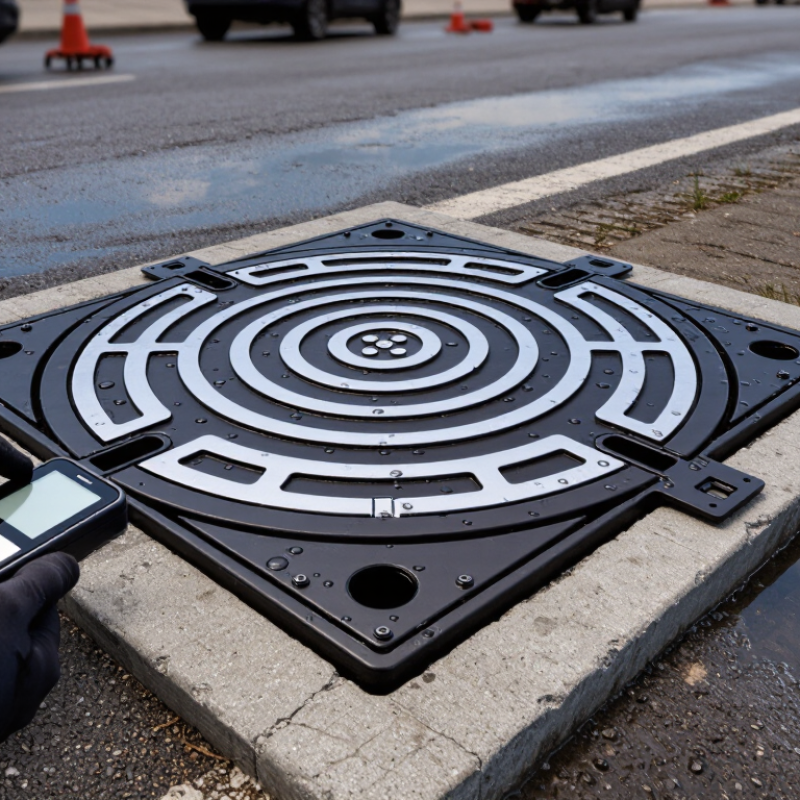
A smart lock manhole cover combines a load-bearing cover with an electronic access mechanism. Authorized workers may unlock it using a credential, keypad, or approved mobile device, depending on the system. Some models record access events or send alerts when a cover is opened. These features can help operators monitor remote utility chambers, drainage networks, and infrastructure sites. The lock does not replace a sound cover, secure installation, or regular inspection.

Applications differ. A connected cover may suit a site where access needs tracking, while a simpler mechanism may be more practical in areas with weak signals or limited maintenance support. Check the cover’s load rating, material, sealing, power requirements, and operating method against the actual location. A system that works well in a dry equipment yard may struggle in a wet, corrosive chamber. More technology is not always better. It is easy to overvalue alerts and overlook battery servicing or emergency access planning.

Tips: Ask who will manage credentials and replace batteries. Confirm how authorized crews can open the cover during a power or network outage. Review installation and inspection requirements with a qualified infrastructure professional. Small details matter. A clear maintenance plan can prevent a smart feature from becoming another point of failure.

How to Choose a Smart Lock Manhole Cover in 2026

Compare EN 124 load classes when selecting a cover for its installation location.

EN 124 class figures are test loads, not recommended vehicle weights. Choose the structural class for the site first, then check that the smart locking system suits the required access control and operating conditions.

Assessing Site Conditions, Load Ratings, and Safety Requirements

A smart lock manhole cover should fit the site, not just the specification sheet. Check traffic patterns, drainage, and the surface around the frame. A cover beside a delivery lane faces repeated wheel impacts; one in a landscaped area may face standing water and soil movement. Small differences matter. Measure the opening and inspect the supporting frame before choosing a replacement. Poor seating can create rocking, noise, and uneven load transfer.

Confirm the required load rating against the heaviest expected vehicles and the applicable local standard. Include dynamic impacts, not only parked weight. The rating is meaningful only when the cover, frame, bedding, and installation all match. Look closely at corrosion, grit, and water paths around the locking mechanism. Below ground, radio signals may weaken, so test communication at the actual installed depth. Check battery access, low-power alerts, and an authorized mechanical release. Keep a safe access procedure for inspection and emergencies; electronic access should not replace it. A site survey can still miss seasonal flooding or future traffic changes. Revisit those assumptions during maintenance planning.

Comparing Locking Mechanisms, Access Controls, and Connectivity

A smart lock manhole cover should match the site’s exposure, service schedule, and response needs. A mechanical lock is simple to inspect, but key control can become messy across multiple crews. An electronic bolt can support remote permissions, though its battery and seals need regular checks. Look for corrosion-resistant hardware and a clear indication that the cover is fully locked. Small details matter. A gritty hinge can defeat an otherwise capable system.

Access controls should reflect who needs entry and when. Individual credentials make audit records more useful than shared codes, especially when contractors rotate. Set permissions by role and time window, then confirm that a supervisor can revoke access promptly. Keep an approved emergency procedure for outages or urgent maintenance. Convenience is not the whole story. A neat access policy may still fail during a rushed night call.

Connectivity needs a field test, not just a specification sheet. Metal covers and underground chambers can weaken wireless signals; test with the lid closed at the actual location. Compare cellular, low-power wide-area, and short-range options against coverage, battery life, and reporting needs. Some systems can store access events locally and sync later, which helps in dead zones. That trade-off is imperfect: delayed alerts may slow response. Record signal quality, battery changes, and lock faults during routine inspections.

How to Choose a Smart Lock Manhole Cover in 2026 - Comparing Locking Mechanisms, Access Controls, and Connectivity

Access / Locking Option How It Works Credential and Access Control Connectivity and Audit Trail Power Requirements Strengths Limitations and Checks Best-Fit Use Case
Mechanical keyed lock A physical key turns a cylinder or operates a locking bolt. Access is controlled by possession of the correct key. Lost-key response usually requires key replacement or lock rekeying. No network connection or electronic access log. No electrical power required. Simple operation; no battery or network dependency; suitable where electronic infrastructure is impractical. Keys can be copied, lost, or shared. Access is difficult to revoke selectively, and activity is not recorded automatically. Low-traffic locations with limited monitoring needs or as a mechanical fallback.
Electronic keypad A keypad verifies a PIN and triggers an electronic latch or lock. PINs can often be assigned to individuals, crews, or time periods. Features depend on the controller. May store local event records; remote reporting requires a separate communications connection. Battery or another local power source is generally needed for the keypad and actuator. No physical key is needed for routine entry; codes can be changed without replacing the lock cylinder. Shared or poorly managed PINs weaken accountability. Check weather protection, keypad usability with gloves, and backup access procedures. Sites where authorized crews need code-based access and remote connectivity is not essential.
RFID or NFC credential A reader checks a card, fob, or compatible credential and releases the lock when authorized. Credentials can be issued, disabled, or assigned access permissions when the system supports centralized credential management. Event logging may be stored locally. Network access is needed for immediate remote updates or live reporting. Reader and lock electronics normally need power; the credential itself may be passive. Quick operation; credentials can be individually assigned and revoked without changing a shared PIN. Lost credentials must be disabled promptly. Confirm credential security, reader sealing, and how access data is retained. Utility teams with managed personnel credentials and frequent site visits.
Bluetooth / mobile credential A nearby phone communicates with the lock or access controller over Bluetooth Low Energy (BLE). Mobile credentials can be issued to users and may support time-limited permissions, depending on the system. Usually works locally at the lock; records or permission updates may sync when the phone or lock reconnects to a network. The lock or reader needs power. The user’s phone also needs sufficient charge and compatible software. Can reduce the need to carry separate cards or keys; useful for controlled, near-field access. Check phone compatibility, offline behavior, credential revocation timing, and an alternative entry method for dead or unavailable phones. Teams already using managed mobile devices and locations without reliable wide-area coverage.
Cellular or LPWAN-connected electronic lock An electronic lock communicates with a remote management system through a cellular or low-power wide-area network connection. May support centrally managed users, permissions, and access schedules; available controls depend on the system design. Can support remote status checks and event reporting when coverage, service, and system configuration allow. Requires a suitable power design. Battery life depends on signal strength, reporting frequency, temperature, lock use, and hardware. Enables remote administration and can reduce the need for on-site credential updates. Coverage can be weak underground or in metal enclosures. Verify antenna placement, network availability, data fees, backup access, and offline operation. Distributed assets where remote oversight is valuable and network coverage has been tested at the installation location.
Hybrid electronic lock with mechanical override Electronic credentials provide routine access, with a separate mechanical key or approved manual release for contingencies. Electronic access can be managed digitally; override-key control requires a separate secure key-management process. Electronic events may be logged, but mechanical override use may not appear in the electronic record. Electronic components need power; the mechanical override does not. Combines managed access with a way to enter during some power or system failures. Define who holds override keys, how their use is documented, and how the lock behaves during low-battery or communications faults. Critical sites where resilience and a documented contingency procedure are priorities.

Selection note: Confirm cover and lock compatibility, load rating, corrosion resistance, ingress protection, safe manual handling, local utility requirements, and the intended access procedure. Connectivity and battery performance must be verified at the actual installation site; underground signal conditions can differ substantially from surface coverage.

Evaluating Power, Monitoring, and Environmental Protection

A smart lock manhole cover is only dependable when its power, monitoring, and enclosure suit the site. In a sealed underground vault, solar charging may be unrealistic. Compare battery life under expected opening frequency and local temperatures, not just laboratory figures. Ask whether the unit reports battery voltage and gives a low-power warning before access is lost. A manual override can help, but it needs a documented, controlled procedure.

Monitoring should show more than “locked” or “unlocked.” Look for event timestamps, tamper alerts, and communication-loss warnings. NISTIR 8259A identifies device cybersecurity capabilities such as access control, data protection, and cybersecurity-state awareness. These are useful criteria for reviewing connected equipment. Environmental protection matters just as much. NOAA recorded 28 U.S. weather and climate disasters with losses of at least $1 billion each in 2023. That is a reminder to consider flooding, debris, and temperature swings. IEC 60529 defines ingress-protection ratings, but an IP rating alone does not describe every installation condition.

Tips: Check the cover’s seal after installation. Confirm that alerts reach the right operator. Ask for test results at the site’s expected temperature and moisture levels. Battery estimates can still miss real-world usage. Verify them during routine inspections.

Verifying Compliance, Installation, and Long-Term Maintenance

Before selecting a smart lock manhole cover in 2026, verify the requirements for its exact location. Ask the responsible utility or site authority which load class, access method, and environmental ratings apply. Request test reports and installation instructions, not just a product sheet. Paperwork matters. A rating for a pedestrian area may not suit a roadway, and a seal’s performance can change with wear.

Check that the cover and frame match the existing opening before scheduling installation. A small mismatch can cause rocking, water entry, or uneven contact. Have qualified personnel install and test the lock, confirming that authorized users can open it and that emergency access remains workable. Keep the area controlled during the work. Fit matters. Record the installed unit’s identifier, test results, and access procedure; these details are easy to lose later.

Plan maintenance around actual site conditions. Inspect the hinge, locking points, seals, and visible corrosion, especially after flooding, freezing weather, or nearby construction. Test battery status and communications at intervals set by the manufacturer, and confirm that alerts reach the right staff. Keep a secure backup access method. It is tempting to assume remote monitoring means fewer inspections, but that assumption needs review. Sensors can miss a developing mechanical problem, and inspection records should note both defects and repairs.

Get In Touch

Drop Us A Message

    Our Contact Details

    • IPS Group BV | Head Office (NB), Technopol 4, 5026 SB Tilburg, The Netherlands

      IPS Group BV | Rhijnspoor 239, 2901 LB Capelle a/d IJssel, The Netherlands
    • sale@qbhardware.org
    • +31 (0) 10 303 2625